Ok ok, so give me a break here. This was the first thing I ever tried to build with Claude.
So I don’t do great at learning via theory. Typically I need to just get into it. But it’s really hard if you don’t have an idea. So then I end up just reading a bunch of theory and freaking myself out with words. No more!!! It’s time I did more with the tools provided and build something….anything.
But what do I want to build? Above, I called out that I have a real problem with learning and letting theory drive pause vs action. OH! So what if that’s the problem I go after. What if I learned how to build an app that solves the problem of getting people to learn through action!
Ok, let’s dive in: what does it actually take to stand up an application with AI? What does the design need to be? What does the prompt need to say? What do you have to figure out about the UI before anything works?
It feels like getting a new box of markers. You know they make marks. You don’t know what colors are in there, what styles they’re good at, or when to reach for which one. The only way to find out is to start drawing.
Take one: a widget in a chat
I started in a regular Claude conversation and asked for a web app that lets people start any skill, take lessons, and track their progress. Within minutes I had a dashboard: a sidebar of skills, progress bars, lesson cards, a quiz with green and red answers, an embedded YouTube video for every lesson.
Then I clicked “AI generate plan” and got “Failed to generate — try again.” Every time.
It took a debug panel to find out why. The chat sandbox couldn’t reach the API at all, and couldn’t save anything either. The whole thing ended with Claude writing a watercolour lesson plan in the chat so I could paste it in by hand.
Take two: a real project
So I tried again, this time as an actual project on my machine. I wrote a better prompt:
I want to create a web app that helps individuals learn new skills and develop daily habits of growing those skills. The application will ask a user to enter information about the skill they want to learn, the system will develop 3 questions to learn more about their goals: how often do they want to practice (with a recommendation of daily), how long they prefer a lesson to be (between 10-20 mins), what their goal is for this skill, and who they want to share their progress with (optional).
Claude asked a few questions back, and my answers turned out to matter as much as the prompt. I let it pick a stack that could last. I asked for both AI-generated lesson plans and a real habit tracker I could adjust by hand. Keep everything client-side for now. Make the first three questions always the same, and add a fourth that’s generated for the specific skill. And if someone doesn’t name anyone to share with, ask them: “Is there anybody you can help motivate by sharing what you’re taking the time to learn?”
What it built
| Feature | What it does |
|---|---|
| Onboarding | Six steps: skill, frequency, duration, goal, an AI question, who to share with |
| AI question | Claude writes a question specific to your skill while you answer the first one |
| Lesson plan | 20 lessons over four weeks, with content, key points and YouTube search links |
| Dashboard | Streak counter, today’s lesson, a weekly calendar, progress by week |
| Habit tracking | Mark lessons done, streaks, total days practiced |
| Lesson editor | Edit titles, content, dates and notes, or add your own lessons |
| Share page | A link with your progress, an AI summary, and a nudge if you didn’t tag anyone |
| Multi-skill | Learn more than one thing and switch between them |
It looked like this:
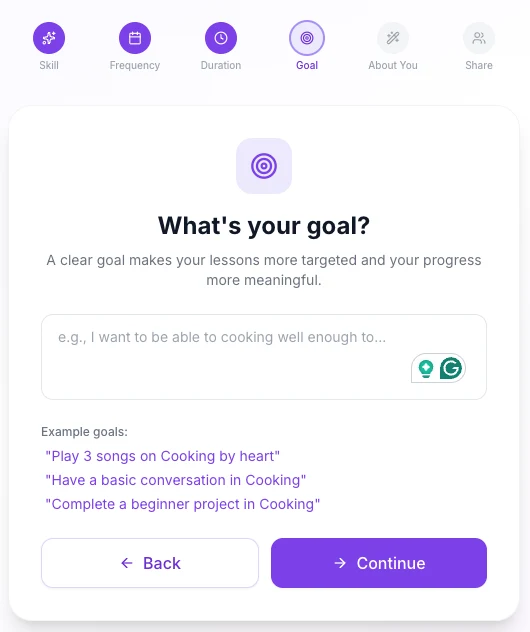 The goal step. I typed “Cooking.” Read the examples.
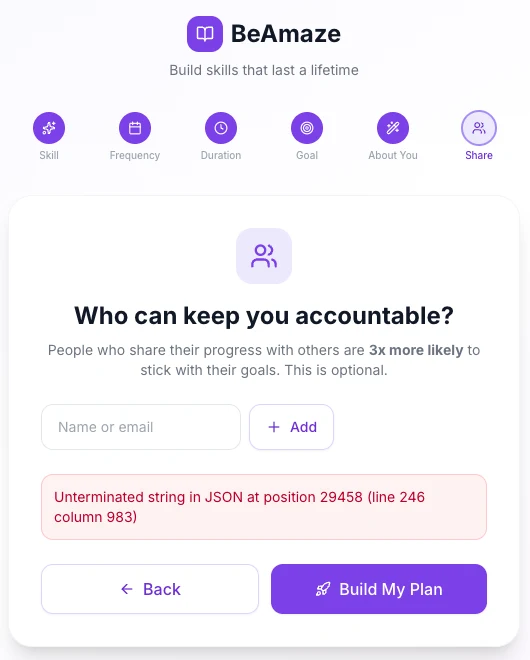 The last step, right after I pressed “Build My Plan.”
The stack
- React + TypeScript + Vite
- Tailwind and Framer Motion for the UI
- Zustand for state, saved in the browser (no account, no backend)
- React Router for the flow
- Anthropic SDK for the questions, lesson plans and share summaries
What I actually learned
The interface lies first.
Both versions looked done long before they were. The chat version had a beautiful dashboard and no way to reach the AI. The project version had a beautiful onboarding flow, and then “Build My Plan” came back with “Unterminated string in JSON at position 29458.” I’d asked for 20 full lessons in one response. The answer ran out of room mid-sentence, and half a JSON file is no JSON file. The version in the repo now asks for 12 lessons and tells Claude to keep them concise.
Templates fill in the blank without understanding it.
I typed “Cooking.” The goal screen offered me “Play 3 songs on Cooking by heart” and “Have a basic conversation in Cooking.” The example goals were a fill-in-the-blank written for music and languages. Nobody, me included, had thought about what a good goal looks like for every kind of skill. That’s design work AI won’t do unless you ask.
Ask for what the AI can actually know.
The chat version asked Claude to pick a YouTube video ID for each lesson. It can’t know that. It guesses, and a guessed ID is a broken embed (or worse, a Rick Roll). The real version asks for YouTube search terms instead. Same idea, but now the AI is doing something it’s actually good at.
Your answers are part of the prompt.
The second version was better mostly because Claude asked me questions and I answered them. Client-side for now. Three fixed questions plus one generated. What to say when nobody’s tagged. Those decisions shaped the app more than my opening paragraph did.
The first experiment is for learning the crayons.
None of this was wasted. Every experiment after this one went faster because I’d already found out what the tools could and couldn’t do. That was the point.
What’s next
BeAmaze runs locally. It isn’t deployed, and the API key lives in the browser, which is fine for me and not fine for anyone else. A small backend would fix that, and the example goals need to actually fit the skill. Maybe someday. For now it did its job: it taught me what’s in the box.
This is part of my experiments series (small things I build, ship, and write about).
Tame Impala - “My Old Ways” (Official Video)